

Redact
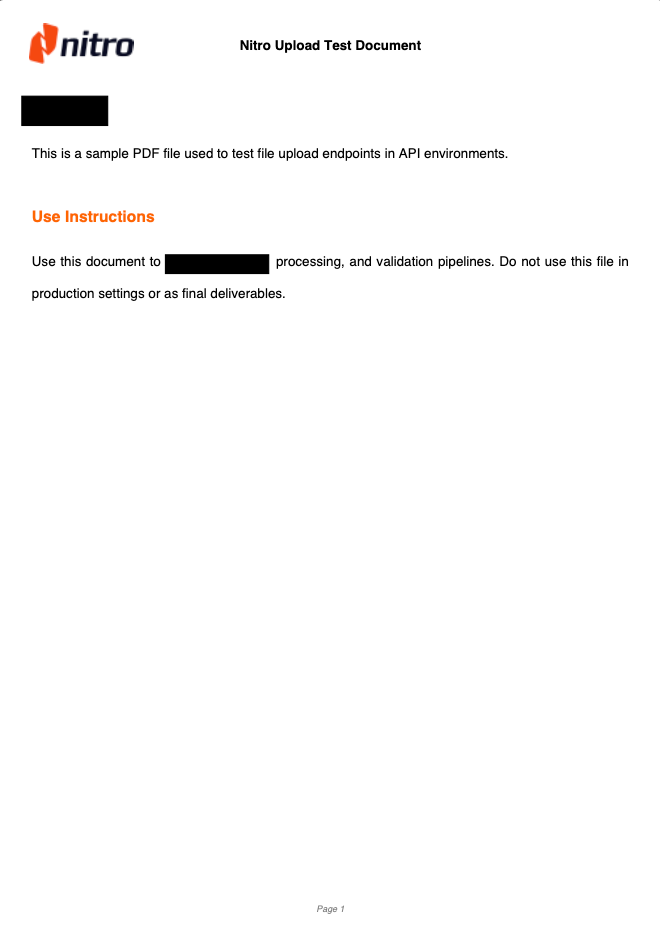
Permanently remove or hide sensitive content in a PDF with the Nitro API by applying redaction boxes to specific pages.
Redact method of the Transformations endpoint lets you add redaction boxes to remove or hide sensitive content in a PDF.
You provide an array of redaction entries, where each entry defines a bounding box to apply on a specific page. Each redaction box includes:
-
pageIndex: The zero-based index of the page where the redaction should be applied. -
boundingBox: The position and size of the redaction area. See the bounding box guide for details on how coordinates work in the Nitro API. -
label(optional): A label rendered onto the redaction box in the output — for example, the reason for the redaction. The label is drawn left-aligned in white 12pt Helvetica and is trimmed to fit the box width (no wrapping or overflow). Boxes without a label render as plain black boxes.
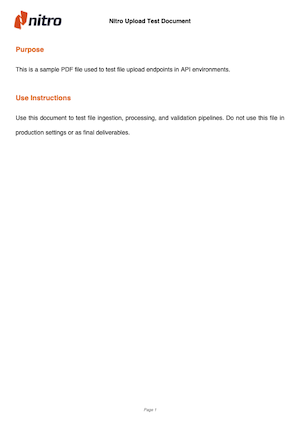
Original PDF
Redacted PDF
Output File Format
The endpoint can return output either as JSON or as a binary file. The format depends on theAccept header (details below), which defaults to application/json.
Processing
When requesting JSON, you can run the operation synchronously or asynchronously. This is determined by thePrefer header (details below).
- In sync mode, the response includes a URL pointing to the processed file.
- In async mode, the request creates a Job, and the response contains the Job ID and status so you can track progress.
Custom File Delivery
The endpoint supports custom file-delivery destinations through the optional delivery parameter. You can provide an upload target, such as your own PUT endpoint or a pre-signed S3 URL, and Nitro will upload the resulting file there. This works for both synchronous and asynchronous processing.-
Sync delivery
In synchronous calls, the delivery parameter lets you direct Nitro to upload the output file to a custom URL endpoint or a pre-signed URL (e.g S3), by providing an upload url in theuploadResultTooruploadResultsToproperties.Custom endpoint
S3 delivery
If you are using S3 to manage delivery uploads, follow this AWS documentation to generate a pre-signed PUT URL. -
Async delivery
In asynchronous flows, you can also provide a custom URL or pre-signed S3 object viauploadResultTooruploadResultsTo, to upload your file(s) once the Job is done processing.Callback
For asynchronous processing, you can also include a callback URL within the delivery parameter. This callback is a POST endpoint that Nitro will call once the Job is created and running, providing details about the file-processing job. Example of Nitro’s callback request body:
Response behavior Matrix
This matrix shows the expected response behavior based on content type, sync/async mode, and custom file-delivery settings.Limits
The Platform API has the following limits:- File size: Maximum of 100 MB per request for direct uploads and synchronous requests; asynchronous requests with remote-file (URL) input allow up to 300 MB. This applies to single-file and multi-file requests (multi-file requests are limited by their combined size). Some operations allow more — Merge accepts up to 1.5 GB for asynchronous remote-file input.
- Page count: Maximum of 500 pages per individual document, or 2500 pages for asynchronous requests with remote-file (URL) input. This applies to single-file and multi-file requests. Multiple documents may exceed the page limit in total.
- Retention time: Inputs and outputs are deleted approximately 15 minutes after the operation completes.
Request
Authorizations
Bearer authentication header of the form Bearer <token>, where <token> is your auth token.
Headers
Controls response format and behavior. See endpoint description above for detailed response combinations.
application/json: Returns JSON response with operation resultapplication/octet-stream: Returns binary file content*/*: Defaults to JSON response
application/json, application/octet-stream, */* Controls synchronous vs asynchronous operation. See endpoint description above for behavior details.
respond-async: Makes request asynchronous, returns job status for polling- No value: Synchronous response
respond-async Body
The Transformations' endpoint method: redact
redact The file to process. It can be provided as a binary upload or as a JSON remote file reference.
This endpoint lets you supply your own URLs to receive the multiple-file outputs. The URLs may point to a custom API endpoint or a pre-signed S3 URL.
The HTTP method defaults to PUT, but you can change it based on your implementation needs via the verb parameter. You can also provide custom headers, such as authentication headers or any others required by your endpoint.
Response
Returns either JSON or binary output depending on the Accept header (defaults to JSON). JSON responses include a file URL for synchronous tasks or a job status for asynchronous tasks.
- Sync - Multiple Files
- Async - Job