> ## Documentation Index
> Fetch the complete documentation index at: https://developers.gonitro.com/docs/llms.txt
> Use this file to discover all available pages before exploring further.
# Redact
> Permanently remove or hide sensitive content in a PDF with the Nitro API by applying redaction boxes to specific pages.
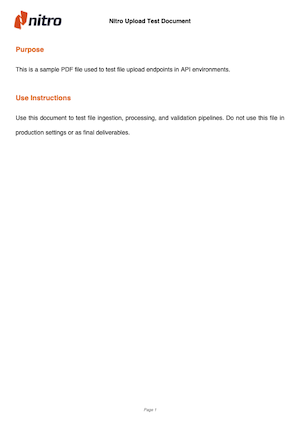
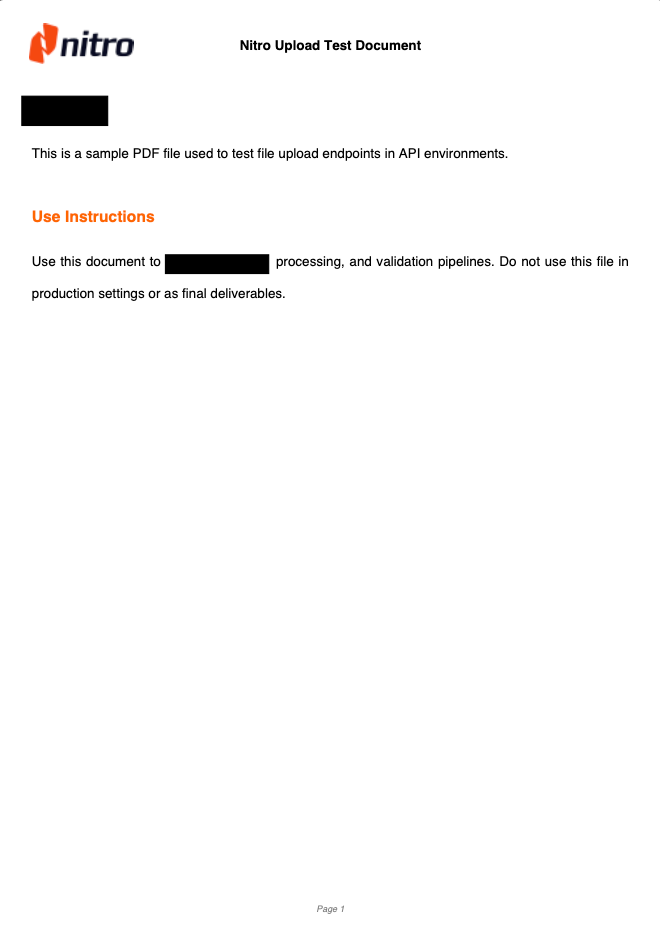
The `Redact` method of the Transformations endpoint lets you add redaction boxes to remove or hide sensitive content in a PDF.
You provide an array of redaction entries, where each entry defines a bounding box to apply on a specific page. Each redaction box includes:
* `pageIndex`: The zero-based index of the page where the redaction should be applied.
* `boundingBox`: The position and size of the redaction area.
See the [bounding box guide](/build-nitro/bounding-box) for details on how coordinates work in the Nitro API.
The [Text Bounding Box](/api-reference/platform/extractions/text-box) method of the Extractions endpoint returns bounding box positions that can be used as input for the Redact method's `redactions` parameter.
Result example:
 Providing an out-of-range page index will result in an error response
### Output File Format
The endpoint can return output either as JSON or as a binary file. The format depends on the `Accept` header (details below), which defaults to application/json.
### Processing
When requesting JSON, you can run the operation synchronously or asynchronously. This is determined by the `Prefer` header (details below).
* In sync mode, the response includes a URL pointing to the processed file.
* In async mode, the request creates a Job, and the response contains the Job ID and status so you can track progress.
Binary (octet-stream) responses are only available for synchronous operations.
### Custom File Delivery
The endpoint supports custom file-delivery destinations through the optional delivery parameter. You can provide an upload target, such as your own PUT endpoint or a pre-signed S3 URL, and Nitro will upload the resulting file there.
This works for both synchronous and asynchronous processing.
* ### Sync delivery
In synchronous calls, the [delivery](#body-delivery) parameter lets you direct Nitro to upload the output file to a custom URL endpoint or a pre-signed URL (e.g S3),
by providing an upload url in the `uploadResultTo` or `uploadResultsTo` properties.
#### Custom endpoint
If implementing the upload endpoint by yourself, make sure your code or middleware configuration accepts requests without content-type headers.
#### S3 delivery
If you are using S3 to manage delivery uploads, follow this [AWS documentation](https://docs.aws.amazon.com/AmazonS3/latest/userguide/PresignedUrlUploadObject.html) to generate a pre-signed PUT URL.
If using the AWS provided Python script, omit the `Content-Type` in Params to get the pre-signed url. For example:
```python theme={null}
url = generate_presigned_url(
s3_client,
"put_object",
{
"Bucket": args.bucket,
"Key": args.key,
# Content-Type: "application/octet-stream" => Omit!
},
1000)
```
* ### Async delivery
In asynchronous flows, you can also provide a custom URL or pre-signed S3 object via `uploadResultTo` or `uploadResultsTo`, to upload your file(s) once the Job is done processing.
#### Callback
For asynchronous processing, you can also include a [callback](#body-delivery-callback) URL within the delivery parameter. This callback is a POST endpoint that Nitro will call once the Job is created and running, providing details about the file-processing job.
Example of Nitro’s callback request body:
```json theme={null}
{
"jobID": "babe2aa7-9b5d-4eb2-a679-5fc12cf0a490",
"location": "https://api.gonitro.dev/jobs/babe2aa7-9b5d-4eb2-a679-5fc12cf0a490"
}
```
#### Response behavior Matrix
This matrix shows the expected response behavior based on content type, sync/async mode, and custom file-delivery settings.
| | **JSON (`application/json`)** | **Binary (`application/octet-stream`)** |
| ---------------------------------- | -------------------------------------------------------------------------------------------------------------------------------------------------------------------------------------------------------------------------------------- | ---------------------------------------------- |
| **Synchronous** | Returns a JSON object with a file(s) URL(s). | Returns the processed file directly as binary. |
| **Asynchronous (`respond-async`)** | Returns a JSON object with a Job ID and status. | Async preference ignored, returns sync binary. |
| **Synchronous delivery** | File delivered to custom endpoint / Bucket, returns success confirmation. | N/A |
| **Asynchronous delivery** | Returns a JSON object with a Job ID and status. The file(s) will be uploaded to the provided PUT endpoint / S3 Bucket at the end of process. If `callback` url is provided, Nitro will notify the endpoint with a JOB ID and location. | N/A |
#### Limits
The Platform API has the following limits:
* File size: Maximum of 100 MB per request. This applies to single-file and multi-file requests.
* Page count: Maximum of 500 pages per individual document. This applies to single-file and multi-file requests. Multiple documents may exceed 500 pages in total.
* Retention time: Inputs and outputs are deleted approximately 15 minutes after the operation completes.
### Request
## OpenAPI
````yaml redact POST /transformations
openapi: 3.0.3
info:
title: Nitro API - Document Intelligence Platform
description: >-
Consolidated API for document intelligence operations including conversions,
extractions, transformations, and job management.
**Supported Operations:**
- **Conversions**: PDF ↔ MS Office, Images ↔ PDF, Various formats to PDF
- **Extractions**: Text extraction, PII detection, Bounding box extraction,
PDF properties
- **Transformations**: Rotate, Split, Merge, Flatten, Password protection,
Redaction
- **Jobs**: Asynchronous processing with status monitoring and result
retrieval
**Global Limits:**
- Maximum file size: 100MB
- Maximum number of pages: 500
version: 1.0.0
contact:
name: Nitro API Support
url: https://help.gonitro.com/support
servers:
- url: https://api.gonitro.dev
description: API server
security: []
tags:
- name: Conversions
description: >-
Document format conversion operations including PDF to/from MS Office,
images, and various other formats
- name: Extractions
description: >-
Data extraction operations for text, metadata, PII detection, and bounding
box information
- name: Transformations
description: >-
PDF transformation operations including rotation, splitting, merging,
compression, protection, and redaction
- name: Generations
description: >-
Document generation operations such as filling PDF AcroForm fields from a
data file or inline values
- name: Jobs
description: >-
Asynchronous job management for monitoring, retrieving results, and
canceling long-running operations
paths:
/transformations:
post:
tags:
- Transformations
summary: Redact PDF pages
description: Redact PDF pages
parameters:
- name: Accept
in: header
schema:
$ref: '#/components/schemas/AcceptHeader'
- name: Prefer
in: header
schema:
$ref: '#/components/schemas/PreferHeader'
requestBody:
required: true
content:
multipart/form-data:
schema:
type: object
properties:
method:
type: string
description: 'The Transformations'' endpoint method: `redact`'
default: redact
enum:
- redact
params:
$ref: '#/components/schemas/RedactParams'
file:
$ref: '#/components/schemas/FileUpload'
delivery:
$ref: '#/components/schemas/DeliveryMultiFileOut'
required:
- method
- params
- file
responses:
'200':
description: >-
Returns either JSON or binary output depending on the Accept header
(defaults to JSON).
JSON responses include a file URL for synchronous tasks or a job status for asynchronous tasks.
content:
application/json:
schema:
oneOf:
- $ref: '#/components/schemas/PlatformOperationFilesResult'
- $ref: '#/components/schemas/AsyncJobResponse'
application/octet-stream:
schema:
type: string
format: binary
'400':
$ref: '#/components/responses/BadRequest'
'401':
$ref: '#/components/responses/Unauthorized'
'404':
$ref: '#/components/responses/NotFound'
'413':
$ref: '#/components/responses/ContentTooLarge'
'422':
$ref: '#/components/responses/UnprocessableEntity'
'500':
$ref: '#/components/responses/InternalServerError'
security:
- BearerAuth: []
components:
schemas:
AcceptHeader:
type: string
enum:
- application/json
- application/octet-stream
- '*/*'
default: '*/*'
description: >-
Controls response format and behavior. See endpoint description above
for detailed response combinations.
- `application/json`: Returns JSON response with operation result
- `application/octet-stream`: Returns binary file content
- `*/*`: Defaults to JSON response
PreferHeader:
type: string
enum:
- respond-async
description: >-
Controls synchronous vs asynchronous operation. See endpoint description
above for behavior details.
- `respond-async`: Makes request asynchronous, returns job status for
polling
- No value: Synchronous response
RedactParams:
title: Redact
type: object
properties:
redactions:
type: array
items:
type: object
properties:
pageIndex:
type: integer
description: Zero-based page index to position a reaction box.
boundingBox:
type: array
items:
type: number
minItems: 4
maxItems: 4
description: >-
An array of numbers in the format [x, y, w, h] that defines
the redaction's bounding box on the page:
- `x, y` are the coordinates of the top-left corner, measured in points (pt).
- `w, h` are the width and height of the bounding box, also in points (pt).
For more information on calculating positions, see the [Bounding Box Guide](/build-nitro/bounding-box).
required:
- pageIndex
- boundingBox
description: >-
Array of redaction areas bounding boxes and corresponding page
indices.
example:
- pageIndex: 0
boundingBox:
- 100
- 100
- 200
- 120
- pageIndex: 1
boundingBox:
- 50
- 50
- 150
- 70
required:
- redactions
FileUpload:
description: >+
The file to process. It can be provided as a binary upload or as a JSON
remote file reference.
oneOf:
- type: string
format: binary
description: |-
#### Binary file
Standard multipart file binary upload field
- type: object
title: Remote file
properties:
URL:
type: string
format: uri
description: URL of the remote file to process
contentType:
type: string
description: The MIME type of the remote file
example: application/pdf
required:
- URL
- contentType
description: |-
#### Remote file
JSON objects containing file URL and content type, sent with specific multipart encoding: `type` and `filename`. The playground **doesn't support** them. Plase test with an alternative tool (Ex: Postman).
Example cURL file field for remote file:
```bash
--form 'file={
"URL":"https://your-file.pdf",
"contentType":"application/pdf"
}
;type=application/vnd.gonitro.url+json
;filename=https://your-file.pdf'
```
DeliveryMultiFileOut:
type: object
properties:
uploadResultsTo:
type: array
items:
$ref: '#/components/schemas/HTTPCall'
description: >-
This endpoint lets you supply your own URLs to receive the multiple-file
outputs. The URLs may point to a custom API endpoint or a pre-signed S3
URL.
The HTTP method defaults to PUT, but you can change it based on your implementation needs via the `verb` parameter. You can also provide custom headers, such as authentication headers or any others required by your endpoint.
PlatformOperationFilesResult:
type: object
title: Sync - Multiple Files
properties:
files:
type: array
items:
$ref: '#/components/schemas/FileInfo'
AsyncJobResponse:
type: object
title: Async - Job
properties:
jobID:
type: string
example: 01234567-89ab-cdef-0123-456789abcdef
status:
type: string
enum:
- running
progress:
type: number
description: Progress of the job as a float between 0.0 and 1.0
format: float
default: 0
example: 0
HTTPCall:
type: object
properties:
URL:
type: string
description: Your delivery endpoint URL
nullable: false
format: uri
verb:
type: string
description: The HTTP method
default: PUT
enum:
- GET
- POST
- PUT
- DELETE
- PATCH
headers:
type: array
nullable: true
description: Headers your file delivery endpoint might need (Optional)
items:
$ref: '#/components/schemas/Header'
required:
- URL
- verb
FileInfo:
type: object
properties:
URL:
type: string
format: uri
description: >-
URL with processed file for download. Field will be `null` if
`delivery` parameter for post-processing upload is defined.
nullable: true
contentType:
type: string
description: The file type
example: application/json
metadata:
type: object
properties:
fileSizeBytes:
type: number
nullable: true
pageCount:
type: number
description: Number of pages in resulting document.
nullable: true
BadRequestProblemDetail:
type: object
description: Bad Request error details
example:
type: https://developers.gonitro.com/docs/build-nitro/errors#400-bad-request
title: Bad Request
status: 400
detail: Request validation failed
instance: /platform/transformations
allOf:
- $ref: '#/components/schemas/ErrorResponse'
UnauthorizedProblemDetail:
type: object
description: Unauthorized error details
example:
type: >-
https://developers.gonitro.com/docs/build-nitro/errors#401-unauthorized
title: Unauthorized
status: 401
detail: Missing or invalid Authorization header
instance: /platform/transformations
allOf:
- $ref: '#/components/schemas/ErrorResponse'
NotFoundProblemDetail:
type: object
description: Not Found error details
example:
type: https://developers.gonitro.com/docs/build-nitro/errors#404-not-found
title: Not Found
status: 404
detail: Resource not found
instance: /platform/transformations
allOf:
- $ref: '#/components/schemas/ErrorResponse'
ContentTooLargeProblemDetail:
type: object
description: Content too large error details
example:
type: >-
https://developers.gonitro.com/docs/build-nitro/errors#413-content-too-large
title: Content too large
status: 413
detail: Uploaded document exceeds the file size limit
instance: /platform/transformations
allOf:
- $ref: '#/components/schemas/ErrorResponse'
UnprocessableEntityProblemDetail:
type: object
description: Unprocessable Entity error details
example:
type: >-
https://developers.gonitro.com/docs/build-nitro/errors#422-unprocessable-entity
title: Unprocessable Entity
status: 422
detail: The request was well-formed but could not be processed
instance: /platform/transformations
allOf:
- $ref: '#/components/schemas/ErrorResponse'
InternalServerErrorProblemDetail:
type: object
description: Internal Server Error details
example:
type: >-
https://developers.gonitro.com/docs/build-nitro/errors#500-internal-server-error
title: Internal Server Error
status: 500
detail: An unexpected error occurred
instance: /platform/transformations
allOf:
- $ref: '#/components/schemas/ErrorResponse'
Header:
type: object
properties:
name:
type: string
value:
type: string
required:
- name
- value
ErrorResponse:
type: object
properties:
type:
type: string
description: A URI reference that identifies the problem type
title:
type: string
description: A short, human-readable summary of the problem type
status:
type: integer
format: int32
description: The HTTP status code
detail:
type: string
description: A human-readable explanation specific to this occurrence
instance:
type: string
description: A URI reference that identifies the specific occurrence
responses:
BadRequest:
description: Bad Request - Invalid request parameters
content:
application/problem+json:
schema:
$ref: '#/components/schemas/BadRequestProblemDetail'
Unauthorized:
description: Unauthorized - Invalid or missing Authorization header
content:
application/problem+json:
schema:
$ref: '#/components/schemas/UnauthorizedProblemDetail'
NotFound:
description: Not Found - Resource not found
content:
application/problem+json:
schema:
$ref: '#/components/schemas/NotFoundProblemDetail'
ContentTooLarge:
description: Content Too Large - File size exceeds limit
content:
application/problem+json:
schema:
$ref: '#/components/schemas/ContentTooLargeProblemDetail'
UnprocessableEntity:
description: Unprocessable Entity - Request cannot be processed
content:
application/problem+json:
schema:
$ref: '#/components/schemas/UnprocessableEntityProblemDetail'
InternalServerError:
description: Internal Server Error - An unexpected error occurred
content:
application/problem+json:
schema:
$ref: '#/components/schemas/InternalServerErrorProblemDetail'
securitySchemes:
BearerAuth:
type: http
scheme: bearer
bearerFormat: JWT
````
Providing an out-of-range page index will result in an error response
### Output File Format
The endpoint can return output either as JSON or as a binary file. The format depends on the `Accept` header (details below), which defaults to application/json.
### Processing
When requesting JSON, you can run the operation synchronously or asynchronously. This is determined by the `Prefer` header (details below).
* In sync mode, the response includes a URL pointing to the processed file.
* In async mode, the request creates a Job, and the response contains the Job ID and status so you can track progress.
Binary (octet-stream) responses are only available for synchronous operations.
### Custom File Delivery
The endpoint supports custom file-delivery destinations through the optional delivery parameter. You can provide an upload target, such as your own PUT endpoint or a pre-signed S3 URL, and Nitro will upload the resulting file there.
This works for both synchronous and asynchronous processing.
* ### Sync delivery
In synchronous calls, the [delivery](#body-delivery) parameter lets you direct Nitro to upload the output file to a custom URL endpoint or a pre-signed URL (e.g S3),
by providing an upload url in the `uploadResultTo` or `uploadResultsTo` properties.
#### Custom endpoint
If implementing the upload endpoint by yourself, make sure your code or middleware configuration accepts requests without content-type headers.
#### S3 delivery
If you are using S3 to manage delivery uploads, follow this [AWS documentation](https://docs.aws.amazon.com/AmazonS3/latest/userguide/PresignedUrlUploadObject.html) to generate a pre-signed PUT URL.
If using the AWS provided Python script, omit the `Content-Type` in Params to get the pre-signed url. For example:
```python theme={null}
url = generate_presigned_url(
s3_client,
"put_object",
{
"Bucket": args.bucket,
"Key": args.key,
# Content-Type: "application/octet-stream" => Omit!
},
1000)
```
* ### Async delivery
In asynchronous flows, you can also provide a custom URL or pre-signed S3 object via `uploadResultTo` or `uploadResultsTo`, to upload your file(s) once the Job is done processing.
#### Callback
For asynchronous processing, you can also include a [callback](#body-delivery-callback) URL within the delivery parameter. This callback is a POST endpoint that Nitro will call once the Job is created and running, providing details about the file-processing job.
Example of Nitro’s callback request body:
```json theme={null}
{
"jobID": "babe2aa7-9b5d-4eb2-a679-5fc12cf0a490",
"location": "https://api.gonitro.dev/jobs/babe2aa7-9b5d-4eb2-a679-5fc12cf0a490"
}
```
#### Response behavior Matrix
This matrix shows the expected response behavior based on content type, sync/async mode, and custom file-delivery settings.
| | **JSON (`application/json`)** | **Binary (`application/octet-stream`)** |
| ---------------------------------- | -------------------------------------------------------------------------------------------------------------------------------------------------------------------------------------------------------------------------------------- | ---------------------------------------------- |
| **Synchronous** | Returns a JSON object with a file(s) URL(s). | Returns the processed file directly as binary. |
| **Asynchronous (`respond-async`)** | Returns a JSON object with a Job ID and status. | Async preference ignored, returns sync binary. |
| **Synchronous delivery** | File delivered to custom endpoint / Bucket, returns success confirmation. | N/A |
| **Asynchronous delivery** | Returns a JSON object with a Job ID and status. The file(s) will be uploaded to the provided PUT endpoint / S3 Bucket at the end of process. If `callback` url is provided, Nitro will notify the endpoint with a JOB ID and location. | N/A |
#### Limits
The Platform API has the following limits:
* File size: Maximum of 100 MB per request. This applies to single-file and multi-file requests.
* Page count: Maximum of 500 pages per individual document. This applies to single-file and multi-file requests. Multiple documents may exceed 500 pages in total.
* Retention time: Inputs and outputs are deleted approximately 15 minutes after the operation completes.
### Request
## OpenAPI
````yaml redact POST /transformations
openapi: 3.0.3
info:
title: Nitro API - Document Intelligence Platform
description: >-
Consolidated API for document intelligence operations including conversions,
extractions, transformations, and job management.
**Supported Operations:**
- **Conversions**: PDF ↔ MS Office, Images ↔ PDF, Various formats to PDF
- **Extractions**: Text extraction, PII detection, Bounding box extraction,
PDF properties
- **Transformations**: Rotate, Split, Merge, Flatten, Password protection,
Redaction
- **Jobs**: Asynchronous processing with status monitoring and result
retrieval
**Global Limits:**
- Maximum file size: 100MB
- Maximum number of pages: 500
version: 1.0.0
contact:
name: Nitro API Support
url: https://help.gonitro.com/support
servers:
- url: https://api.gonitro.dev
description: API server
security: []
tags:
- name: Conversions
description: >-
Document format conversion operations including PDF to/from MS Office,
images, and various other formats
- name: Extractions
description: >-
Data extraction operations for text, metadata, PII detection, and bounding
box information
- name: Transformations
description: >-
PDF transformation operations including rotation, splitting, merging,
compression, protection, and redaction
- name: Generations
description: >-
Document generation operations such as filling PDF AcroForm fields from a
data file or inline values
- name: Jobs
description: >-
Asynchronous job management for monitoring, retrieving results, and
canceling long-running operations
paths:
/transformations:
post:
tags:
- Transformations
summary: Redact PDF pages
description: Redact PDF pages
parameters:
- name: Accept
in: header
schema:
$ref: '#/components/schemas/AcceptHeader'
- name: Prefer
in: header
schema:
$ref: '#/components/schemas/PreferHeader'
requestBody:
required: true
content:
multipart/form-data:
schema:
type: object
properties:
method:
type: string
description: 'The Transformations'' endpoint method: `redact`'
default: redact
enum:
- redact
params:
$ref: '#/components/schemas/RedactParams'
file:
$ref: '#/components/schemas/FileUpload'
delivery:
$ref: '#/components/schemas/DeliveryMultiFileOut'
required:
- method
- params
- file
responses:
'200':
description: >-
Returns either JSON or binary output depending on the Accept header
(defaults to JSON).
JSON responses include a file URL for synchronous tasks or a job status for asynchronous tasks.
content:
application/json:
schema:
oneOf:
- $ref: '#/components/schemas/PlatformOperationFilesResult'
- $ref: '#/components/schemas/AsyncJobResponse'
application/octet-stream:
schema:
type: string
format: binary
'400':
$ref: '#/components/responses/BadRequest'
'401':
$ref: '#/components/responses/Unauthorized'
'404':
$ref: '#/components/responses/NotFound'
'413':
$ref: '#/components/responses/ContentTooLarge'
'422':
$ref: '#/components/responses/UnprocessableEntity'
'500':
$ref: '#/components/responses/InternalServerError'
security:
- BearerAuth: []
components:
schemas:
AcceptHeader:
type: string
enum:
- application/json
- application/octet-stream
- '*/*'
default: '*/*'
description: >-
Controls response format and behavior. See endpoint description above
for detailed response combinations.
- `application/json`: Returns JSON response with operation result
- `application/octet-stream`: Returns binary file content
- `*/*`: Defaults to JSON response
PreferHeader:
type: string
enum:
- respond-async
description: >-
Controls synchronous vs asynchronous operation. See endpoint description
above for behavior details.
- `respond-async`: Makes request asynchronous, returns job status for
polling
- No value: Synchronous response
RedactParams:
title: Redact
type: object
properties:
redactions:
type: array
items:
type: object
properties:
pageIndex:
type: integer
description: Zero-based page index to position a reaction box.
boundingBox:
type: array
items:
type: number
minItems: 4
maxItems: 4
description: >-
An array of numbers in the format [x, y, w, h] that defines
the redaction's bounding box on the page:
- `x, y` are the coordinates of the top-left corner, measured in points (pt).
- `w, h` are the width and height of the bounding box, also in points (pt).
For more information on calculating positions, see the [Bounding Box Guide](/build-nitro/bounding-box).
required:
- pageIndex
- boundingBox
description: >-
Array of redaction areas bounding boxes and corresponding page
indices.
example:
- pageIndex: 0
boundingBox:
- 100
- 100
- 200
- 120
- pageIndex: 1
boundingBox:
- 50
- 50
- 150
- 70
required:
- redactions
FileUpload:
description: >+
The file to process. It can be provided as a binary upload or as a JSON
remote file reference.
oneOf:
- type: string
format: binary
description: |-
#### Binary file
Standard multipart file binary upload field
- type: object
title: Remote file
properties:
URL:
type: string
format: uri
description: URL of the remote file to process
contentType:
type: string
description: The MIME type of the remote file
example: application/pdf
required:
- URL
- contentType
description: |-
#### Remote file
JSON objects containing file URL and content type, sent with specific multipart encoding: `type` and `filename`. The playground **doesn't support** them. Plase test with an alternative tool (Ex: Postman).
Example cURL file field for remote file:
```bash
--form 'file={
"URL":"https://your-file.pdf",
"contentType":"application/pdf"
}
;type=application/vnd.gonitro.url+json
;filename=https://your-file.pdf'
```
DeliveryMultiFileOut:
type: object
properties:
uploadResultsTo:
type: array
items:
$ref: '#/components/schemas/HTTPCall'
description: >-
This endpoint lets you supply your own URLs to receive the multiple-file
outputs. The URLs may point to a custom API endpoint or a pre-signed S3
URL.
The HTTP method defaults to PUT, but you can change it based on your implementation needs via the `verb` parameter. You can also provide custom headers, such as authentication headers or any others required by your endpoint.
PlatformOperationFilesResult:
type: object
title: Sync - Multiple Files
properties:
files:
type: array
items:
$ref: '#/components/schemas/FileInfo'
AsyncJobResponse:
type: object
title: Async - Job
properties:
jobID:
type: string
example: 01234567-89ab-cdef-0123-456789abcdef
status:
type: string
enum:
- running
progress:
type: number
description: Progress of the job as a float between 0.0 and 1.0
format: float
default: 0
example: 0
HTTPCall:
type: object
properties:
URL:
type: string
description: Your delivery endpoint URL
nullable: false
format: uri
verb:
type: string
description: The HTTP method
default: PUT
enum:
- GET
- POST
- PUT
- DELETE
- PATCH
headers:
type: array
nullable: true
description: Headers your file delivery endpoint might need (Optional)
items:
$ref: '#/components/schemas/Header'
required:
- URL
- verb
FileInfo:
type: object
properties:
URL:
type: string
format: uri
description: >-
URL with processed file for download. Field will be `null` if
`delivery` parameter for post-processing upload is defined.
nullable: true
contentType:
type: string
description: The file type
example: application/json
metadata:
type: object
properties:
fileSizeBytes:
type: number
nullable: true
pageCount:
type: number
description: Number of pages in resulting document.
nullable: true
BadRequestProblemDetail:
type: object
description: Bad Request error details
example:
type: https://developers.gonitro.com/docs/build-nitro/errors#400-bad-request
title: Bad Request
status: 400
detail: Request validation failed
instance: /platform/transformations
allOf:
- $ref: '#/components/schemas/ErrorResponse'
UnauthorizedProblemDetail:
type: object
description: Unauthorized error details
example:
type: >-
https://developers.gonitro.com/docs/build-nitro/errors#401-unauthorized
title: Unauthorized
status: 401
detail: Missing or invalid Authorization header
instance: /platform/transformations
allOf:
- $ref: '#/components/schemas/ErrorResponse'
NotFoundProblemDetail:
type: object
description: Not Found error details
example:
type: https://developers.gonitro.com/docs/build-nitro/errors#404-not-found
title: Not Found
status: 404
detail: Resource not found
instance: /platform/transformations
allOf:
- $ref: '#/components/schemas/ErrorResponse'
ContentTooLargeProblemDetail:
type: object
description: Content too large error details
example:
type: >-
https://developers.gonitro.com/docs/build-nitro/errors#413-content-too-large
title: Content too large
status: 413
detail: Uploaded document exceeds the file size limit
instance: /platform/transformations
allOf:
- $ref: '#/components/schemas/ErrorResponse'
UnprocessableEntityProblemDetail:
type: object
description: Unprocessable Entity error details
example:
type: >-
https://developers.gonitro.com/docs/build-nitro/errors#422-unprocessable-entity
title: Unprocessable Entity
status: 422
detail: The request was well-formed but could not be processed
instance: /platform/transformations
allOf:
- $ref: '#/components/schemas/ErrorResponse'
InternalServerErrorProblemDetail:
type: object
description: Internal Server Error details
example:
type: >-
https://developers.gonitro.com/docs/build-nitro/errors#500-internal-server-error
title: Internal Server Error
status: 500
detail: An unexpected error occurred
instance: /platform/transformations
allOf:
- $ref: '#/components/schemas/ErrorResponse'
Header:
type: object
properties:
name:
type: string
value:
type: string
required:
- name
- value
ErrorResponse:
type: object
properties:
type:
type: string
description: A URI reference that identifies the problem type
title:
type: string
description: A short, human-readable summary of the problem type
status:
type: integer
format: int32
description: The HTTP status code
detail:
type: string
description: A human-readable explanation specific to this occurrence
instance:
type: string
description: A URI reference that identifies the specific occurrence
responses:
BadRequest:
description: Bad Request - Invalid request parameters
content:
application/problem+json:
schema:
$ref: '#/components/schemas/BadRequestProblemDetail'
Unauthorized:
description: Unauthorized - Invalid or missing Authorization header
content:
application/problem+json:
schema:
$ref: '#/components/schemas/UnauthorizedProblemDetail'
NotFound:
description: Not Found - Resource not found
content:
application/problem+json:
schema:
$ref: '#/components/schemas/NotFoundProblemDetail'
ContentTooLarge:
description: Content Too Large - File size exceeds limit
content:
application/problem+json:
schema:
$ref: '#/components/schemas/ContentTooLargeProblemDetail'
UnprocessableEntity:
description: Unprocessable Entity - Request cannot be processed
content:
application/problem+json:
schema:
$ref: '#/components/schemas/UnprocessableEntityProblemDetail'
InternalServerError:
description: Internal Server Error - An unexpected error occurred
content:
application/problem+json:
schema:
$ref: '#/components/schemas/InternalServerErrorProblemDetail'
securitySchemes:
BearerAuth:
type: http
scheme: bearer
bearerFormat: JWT
````