> ## Documentation Index
> Fetch the complete documentation index at: https://developers.gonitro.com/docs/llms.txt
> Use this file to discover all available pages before exploring further.
# Tables
> Automatically extract tabular data from PDFs with the Nitro API, returning structured rows and columns for each table.
The **Extract Tables** method of the Extractions endpoint allows you to retrieve tabular data from PDF documents. This endpoint requires no additional parameters and automatically identifies all tables present in the file.
The endpoint returns an array of tables, each containing the following fields:
* `title`: The title of the table (if detected).
* `cells`: A 2D array of string values. Indexed as `cells[row][column]`.
* `footers`: An array of table footer notes or annotations (if available).
* `confidences`: Confidence scores (0 to 1) for each extracted value in the `cells` array.
* `averageConfidence`: The mean confidence score for all cell values within the table.
* `headerCells`: Coordinates of detected header cells, provided as `[[row, column], ...]`.
* `summaryCells`: Coordinates of summary cells, provided as `[[row, column], ...]`.
### Uniform Grid
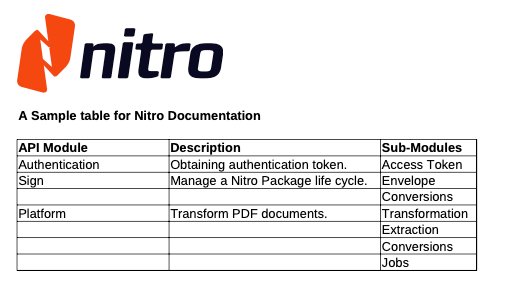
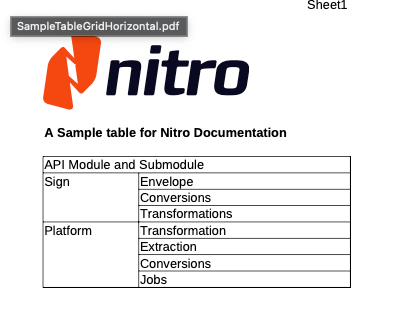
To ensure a consistent and predictable output format, the Extract Tables method processes tables using a uniform grid of cells.
In this example, some cells like "Sign" and "Platform" are composed of multiple cells, due to the fact that the third column (index 2) has multiple row values.
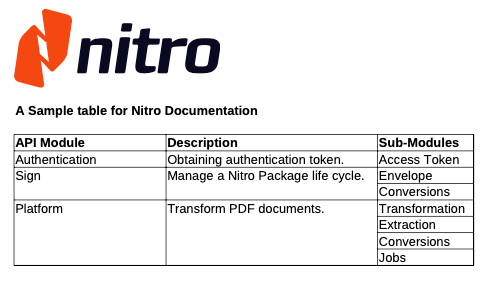 When processing the original file, the extract tables method will divide the grid in uniform cells, respecting the smallest possible unit, like in the following visualization.
 #### Handling Merged Cells
When a table in a PDF contains merged cells, the content is mapped to the cells array based on their position within the uniform grid.
**Vertical Overlap (Rows)**
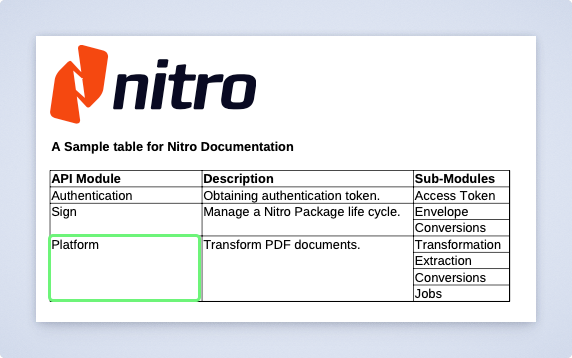
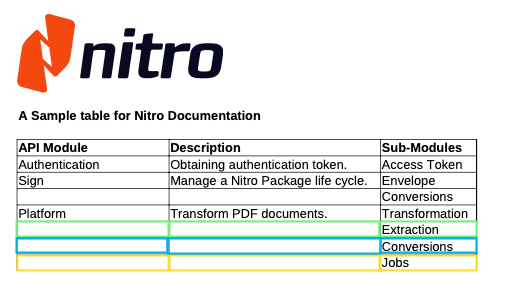
When a cell merges multiple rows, the remaining indices covered by the original merge are returned as empty placeholders ("") in **separate rows**, to maintain the grid's structural integrity. You can see it in the `cells` field in the example below:
#### Handling Merged Cells
When a table in a PDF contains merged cells, the content is mapped to the cells array based on their position within the uniform grid.
**Vertical Overlap (Rows)**
When a cell merges multiple rows, the remaining indices covered by the original merge are returned as empty placeholders ("") in **separate rows**, to maintain the grid's structural integrity. You can see it in the `cells` field in the example below:
 ```json theme={null}
{
"cells": [
...
[
"",
"",
"Extraction"
],
[
"",
"",
"Conversions"
],
[
"",
"",
"Jobs"
]
]
}
```
**Horizontal Overlap (Columns)**
If a table has cells that overlap over multiple columns, the content will be divided according to the position on the base grid as well.
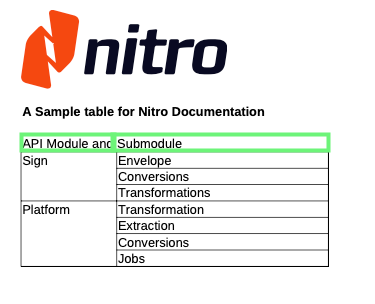
In the following example, the "API Module and Submodule" content in the merged first row is divided in two cells in the response.
In this example, the first row's content spans two columns.
```json theme={null}
{
"cells": [
...
[
"",
"",
"Extraction"
],
[
"",
"",
"Conversions"
],
[
"",
"",
"Jobs"
]
]
}
```
**Horizontal Overlap (Columns)**
If a table has cells that overlap over multiple columns, the content will be divided according to the position on the base grid as well.
In the following example, the "API Module and Submodule" content in the merged first row is divided in two cells in the response.
In this example, the first row's content spans two columns.
 When processing the original file, the extract tables method will divide the grid in uniform cells, dividing the content over multiple cells.
 ```json theme={null}
{
"cells": [
[
"API Module and",
"Submodule"
],
[
"Sign",
"Envelope"
],
[
"",
"Conversions"
]
]
}
```
### Output File Format
The endpoint can return output either as JSON or as a binary file. The format depends on the `Accept` header (details below), which defaults to application/json.
### Processing
When requesting JSON, you can run the operation synchronously or asynchronously. This is determined by the `Prefer` header (details below).
* In sync mode, the response includes a URL pointing to the processed file.
* In async mode, the request creates a Job, and the response contains the Job ID and status so you can track progress.
Binary (octet-stream) responses are only available for synchronous operations.
### Custom File Delivery
The endpoint supports custom file-delivery destinations through the optional delivery parameter. You can provide an upload target, such as your own PUT endpoint or a pre-signed S3 URL, and Nitro will upload the resulting file there.
This works for both synchronous and asynchronous processing.
* ### Sync delivery
In synchronous calls, the [delivery](#body-delivery) parameter lets you direct Nitro to upload the output file to a custom URL endpoint or a pre-signed URL (e.g S3),
by providing an upload url in the `uploadResultTo` or `uploadResultsTo` properties.
#### Custom endpoint
If implementing the upload endpoint by yourself, make sure your code or middleware configuration accepts requests without content-type headers.
#### S3 delivery
If you are using S3 to manage delivery uploads, follow this [AWS documentation](https://docs.aws.amazon.com/AmazonS3/latest/userguide/PresignedUrlUploadObject.html) to generate a pre-signed PUT URL.
If using the AWS provided Python script, omit the `Content-Type` in Params to get the pre-signed url. For example:
```python theme={null}
url = generate_presigned_url(
s3_client,
"put_object",
{
"Bucket": args.bucket,
"Key": args.key,
# Content-Type: "application/octet-stream" => Omit!
},
1000)
```
* ### Async delivery
In asynchronous flows, you can also provide a custom URL or pre-signed S3 object via `uploadResultTo` or `uploadResultsTo`, to upload your file(s) once the Job is done processing.
#### Callback
For asynchronous processing, you can also include a [callback](#body-delivery-callback) URL within the delivery parameter. This callback is a POST endpoint that Nitro will call once the Job is created and running, providing details about the file-processing job.
Example of Nitro’s callback request body:
```json theme={null}
{
"jobID": "babe2aa7-9b5d-4eb2-a679-5fc12cf0a490",
"location": "https://api.gonitro.dev/jobs/babe2aa7-9b5d-4eb2-a679-5fc12cf0a490"
}
```
#### Response behavior Matrix
This matrix shows the expected response behavior based on content type, sync/async mode, and custom file-delivery settings.
| | **JSON (`application/json`)** | **Binary (`application/octet-stream`)** |
| ---------------------------------- | -------------------------------------------------------------------------------------------------------------------------------------------------------------------------------------------------------------------------------------- | ---------------------------------------------- |
| **Synchronous** | Returns a JSON object with a file(s) URL(s). | Returns the processed file directly as binary. |
| **Asynchronous (`respond-async`)** | Returns a JSON object with a Job ID and status. | Async preference ignored, returns sync binary. |
| **Synchronous delivery** | File delivered to custom endpoint / Bucket, returns success confirmation. | N/A |
| **Asynchronous delivery** | Returns a JSON object with a Job ID and status. The file(s) will be uploaded to the provided PUT endpoint / S3 Bucket at the end of process. If `callback` url is provided, Nitro will notify the endpoint with a JOB ID and location. | N/A |
#### Limits
The Platform API has the following limits:
* File size: Maximum of 100 MB per request. This applies to single-file and multi-file requests.
* Page count: Maximum of 500 pages per individual document. This applies to single-file and multi-file requests. Multiple documents may exceed 500 pages in total.
* Retention time: Inputs and outputs are deleted approximately 15 minutes after the operation completes.
### Request
## OpenAPI
````yaml tables POST /extractions
openapi: 3.0.3
info:
title: Nitro API - Document Intelligence Platform
description: >-
Consolidated API for document intelligence operations including conversions,
extractions, transformations, and job management.
**Supported Operations:**
- **Conversions**: PDF ↔ MS Office, Images ↔ PDF, Various formats to PDF
- **Extractions**: Text extraction, PII detection, Bounding box extraction,
PDF properties
- **Transformations**: Rotate, Split, Merge, Flatten, Password protection,
Redaction
- **Jobs**: Asynchronous processing with status monitoring and result
retrieval
**Global Limits:**
- Maximum file size: 100MB
- Maximum number of pages: 500
version: 1.0.0
contact:
name: Nitro API Support
url: https://help.gonitro.com/support
servers:
- url: https://api.gonitro.dev
description: API server
security: []
tags:
- name: Conversions
description: >-
Document format conversion operations including PDF to/from MS Office,
images, and various other formats
- name: Extractions
description: >-
Data extraction operations for text, metadata, PII detection, and bounding
box information
- name: Transformations
description: >-
PDF transformation operations including rotation, splitting, merging,
compression, protection, and redaction
- name: Generations
description: >-
Document generation operations such as filling PDF AcroForm fields from a
data file or inline values
- name: Jobs
description: >-
Asynchronous job management for monitoring, retrieving results, and
canceling long-running operations
paths:
/extractions:
post:
tags:
- Extractions
summary: Extract Tables from PDF
description: Extract Tables from PDF document
parameters:
- name: Accept
in: header
schema:
$ref: '#/components/schemas/AcceptHeader'
- name: Prefer
in: header
schema:
$ref: '#/components/schemas/PreferHeader'
requestBody:
required: true
content:
multipart/form-data:
schema:
type: object
properties:
method:
type: string
description: 'The Extractions'' endpoint method: `extract-tables`'
default: extract-tables
enum:
- extract-tables
file:
$ref: '#/components/schemas/FileUpload'
delivery:
$ref: '#/components/schemas/DeliverySingleFileOut'
required:
- method
- params
- file
responses:
'200':
description: >-
Returns either JSON or binary output depending on the Accept header
(defaults to JSON).
JSON responses include a file URL for synchronous tasks or a job status for asynchronous tasks.
content:
application/json:
schema:
oneOf:
- $ref: '#/components/schemas/ExtractTablesResponse'
- $ref: '#/components/schemas/AsyncJobResponse'
application/octet-stream:
schema:
type: string
format: binary
'400':
$ref: '#/components/responses/BadRequest'
'401':
$ref: '#/components/responses/Unauthorized'
'404':
$ref: '#/components/responses/NotFound'
'413':
$ref: '#/components/responses/ContentTooLarge'
'422':
$ref: '#/components/responses/UnprocessableEntity'
'500':
$ref: '#/components/responses/InternalServerError'
security:
- BearerAuth: []
components:
schemas:
AcceptHeader:
type: string
enum:
- application/json
- application/octet-stream
- '*/*'
default: '*/*'
description: >-
Controls response format and behavior. See endpoint description above
for detailed response combinations.
- `application/json`: Returns JSON response with operation result
- `application/octet-stream`: Returns binary file content
- `*/*`: Defaults to JSON response
PreferHeader:
type: string
enum:
- respond-async
description: >-
Controls synchronous vs asynchronous operation. See endpoint description
above for behavior details.
- `respond-async`: Makes request asynchronous, returns job status for
polling
- No value: Synchronous response
FileUpload:
description: >+
The file to process. It can be provided as a binary upload or as a JSON
remote file reference.
oneOf:
- type: string
format: binary
description: |-
#### Binary file
Standard multipart file binary upload field
- type: object
title: Remote file
properties:
URL:
type: string
format: uri
description: URL of the remote file to process
contentType:
type: string
description: The MIME type of the remote file
example: application/pdf
required:
- URL
- contentType
description: |-
#### Remote file
JSON objects containing file URL and content type, sent with specific multipart encoding: `type` and `filename`. The playground **doesn't support** them. Plase test with an alternative tool (Ex: Postman).
Example cURL file field for remote file:
```bash
--form 'file={
"URL":"https://your-file.pdf",
"contentType":"application/pdf"
}
;type=application/vnd.gonitro.url+json
;filename=https://your-file.pdf'
```
DeliverySingleFileOut:
type: object
properties:
uploadResultTo:
$ref: '#/components/schemas/HTTPCall'
callback:
$ref: '#/components/schemas/Callback'
description: >-
This endpoint lets you supply your own URL to receive the single-file
output. The URL may point to a custom API endpoint or a pre-signed S3
URL.
The HTTP method defaults to PUT, but you can change it based on your implementation needs via the `verb` parameter. You can also provide custom headers, such as authentication headers or any others required by your endpoint.
ExtractTablesResponse:
type: object
title: Sync - Tables
properties:
result:
$ref: '#/components/schemas/TablesResultType'
required:
- result
AsyncJobResponse:
type: object
title: Async - Job
properties:
jobID:
type: string
example: 01234567-89ab-cdef-0123-456789abcdef
status:
type: string
enum:
- running
progress:
type: number
description: Progress of the job as a float between 0.0 and 1.0
format: float
default: 0
example: 0
HTTPCall:
type: object
properties:
URL:
type: string
description: Your delivery endpoint URL
nullable: false
format: uri
verb:
type: string
description: The HTTP method
default: PUT
enum:
- GET
- POST
- PUT
- DELETE
- PATCH
headers:
type: array
nullable: true
description: Headers your file delivery endpoint might need (Optional)
items:
$ref: '#/components/schemas/Header'
required:
- URL
- verb
Callback:
type: object
description: >-
POST endpoint that will get JOB ID and location when processing starts
only on async processesing (see example above)
properties:
URL:
type: string
description: Your POST endpoint callback URL.
nullable: false
format: uri
headers:
type: array
description: Headers your callback endpoint might need
items:
$ref: '#/components/schemas/Header'
required:
- URL
TablesResultType:
type: object
title: Tables
properties:
tables:
type: array
items:
$ref: '#/components/schemas/ExtractedTable'
description: Array of extracted tables from the document
required:
- tables
BadRequestProblemDetail:
type: object
description: Bad Request error details
example:
type: https://developers.gonitro.com/docs/build-nitro/errors#400-bad-request
title: Bad Request
status: 400
detail: Request validation failed
instance: /platform/extractions
allOf:
- $ref: '#/components/schemas/ErrorResponse'
UnauthorizedProblemDetail:
type: object
description: Unauthorized error details
example:
type: >-
https://developers.gonitro.com/docs/build-nitro/errors#401-unauthorized
title: Unauthorized
status: 401
detail: Missing or invalid Authorization header
instance: /platform/extractions
allOf:
- $ref: '#/components/schemas/ErrorResponse'
NotFoundProblemDetail:
type: object
description: Not Found error details
example:
type: https://developers.gonitro.com/docs/build-nitro/errors#404-not-found
title: Not Found
status: 404
detail: Resource not found
instance: /platform/extractions
allOf:
- $ref: '#/components/schemas/ErrorResponse'
ContentTooLargeProblemDetail:
type: object
description: Content too large error details
example:
type: >-
https://developers.gonitro.com/docs/build-nitro/errors#413-content-too-large
title: Content too large
status: 413
detail: Uploaded document exceeds the file size limit
instance: /platform/extractions
allOf:
- $ref: '#/components/schemas/ErrorResponse'
UnprocessableEntityProblemDetail:
type: object
description: Unprocessable Entity error details
example:
type: >-
https://developers.gonitro.com/docs/build-nitro/errors#422-unprocessable-entity
title: Unprocessable Entity
status: 422
detail: The request was well-formed but could not be processed
instance: /platform/extractions
allOf:
- $ref: '#/components/schemas/ErrorResponse'
InternalServerErrorProblemDetail:
type: object
description: Internal Server Error details
example:
type: >-
https://developers.gonitro.com/docs/build-nitro/errors#500-internal-server-error
title: Internal Server Error
status: 500
detail: An unexpected error occurred
instance: /platform/extractions
allOf:
- $ref: '#/components/schemas/ErrorResponse'
Header:
type: object
properties:
name:
type: string
value:
type: string
required:
- name
- value
ExtractedTable:
type: object
properties:
ID:
type: string
description: Unique identifier for the extracted table
pageIndices:
type: array
items:
type: integer
description: Array of page indices where the table appears (0-based)
tableData:
$ref: '#/components/schemas/TableData'
required:
- ID
- pageIndices
- tableData
ErrorResponse:
type: object
properties:
type:
type: string
description: A URI reference that identifies the problem type
title:
type: string
description: A short, human-readable summary of the problem type
status:
type: integer
format: int32
description: The HTTP status code
detail:
type: string
description: A human-readable explanation specific to this occurrence
instance:
type: string
description: A URI reference that identifies the specific occurrence
TableData:
type: object
properties:
title:
type: string
description: The title of the table (if available)
cells:
type: array
items:
type: array
items:
oneOf:
- type: string
- type: number
description: >-
2D array representing table cell values. The first value index
refers to the row, and the second the column.
footers:
type: array
items:
type: string
description: Array of footer text/notes for the table.
confidences:
type: array
items:
type: array
items:
type: number
format: float
minimum: 0
maximum: 1
description: 2D array of confidence scores corresponding to each extracted cell.
averageConfidence:
type: number
format: float
minimum: 0
maximum: 1
description: Average confidence score for the entire table.
headerCells:
type: array
items:
type: array
items:
type: integer
minItems: 2
maxItems: 2
description: >-
Array of [row, column] coordinates identifying header cells
(1-based)
summaryCells:
type: array
items:
type: array
items:
type: integer
minItems: 2
maxItems: 2
description: >-
Array of [row, column] coordinates identifying summary cells
(1-based)
required:
- title
- cells
- footers
- confidences
- averageConfidence
- headerCells
- summaryCells
responses:
BadRequest:
description: Bad Request - Invalid request parameters
content:
application/problem+json:
schema:
$ref: '#/components/schemas/BadRequestProblemDetail'
Unauthorized:
description: Unauthorized - Invalid or missing Authorization header
content:
application/problem+json:
schema:
$ref: '#/components/schemas/UnauthorizedProblemDetail'
NotFound:
description: Not Found - Resource not found
content:
application/problem+json:
schema:
$ref: '#/components/schemas/NotFoundProblemDetail'
ContentTooLarge:
description: Content Too Large - File size exceeds limit
content:
application/problem+json:
schema:
$ref: '#/components/schemas/ContentTooLargeProblemDetail'
UnprocessableEntity:
description: Unprocessable Entity - Request cannot be processed
content:
application/problem+json:
schema:
$ref: '#/components/schemas/UnprocessableEntityProblemDetail'
InternalServerError:
description: Internal Server Error - An unexpected error occurred
content:
application/problem+json:
schema:
$ref: '#/components/schemas/InternalServerErrorProblemDetail'
securitySchemes:
BearerAuth:
type: http
scheme: bearer
bearerFormat: JWT
````
```json theme={null}
{
"cells": [
[
"API Module and",
"Submodule"
],
[
"Sign",
"Envelope"
],
[
"",
"Conversions"
]
]
}
```
### Output File Format
The endpoint can return output either as JSON or as a binary file. The format depends on the `Accept` header (details below), which defaults to application/json.
### Processing
When requesting JSON, you can run the operation synchronously or asynchronously. This is determined by the `Prefer` header (details below).
* In sync mode, the response includes a URL pointing to the processed file.
* In async mode, the request creates a Job, and the response contains the Job ID and status so you can track progress.
Binary (octet-stream) responses are only available for synchronous operations.
### Custom File Delivery
The endpoint supports custom file-delivery destinations through the optional delivery parameter. You can provide an upload target, such as your own PUT endpoint or a pre-signed S3 URL, and Nitro will upload the resulting file there.
This works for both synchronous and asynchronous processing.
* ### Sync delivery
In synchronous calls, the [delivery](#body-delivery) parameter lets you direct Nitro to upload the output file to a custom URL endpoint or a pre-signed URL (e.g S3),
by providing an upload url in the `uploadResultTo` or `uploadResultsTo` properties.
#### Custom endpoint
If implementing the upload endpoint by yourself, make sure your code or middleware configuration accepts requests without content-type headers.
#### S3 delivery
If you are using S3 to manage delivery uploads, follow this [AWS documentation](https://docs.aws.amazon.com/AmazonS3/latest/userguide/PresignedUrlUploadObject.html) to generate a pre-signed PUT URL.
If using the AWS provided Python script, omit the `Content-Type` in Params to get the pre-signed url. For example:
```python theme={null}
url = generate_presigned_url(
s3_client,
"put_object",
{
"Bucket": args.bucket,
"Key": args.key,
# Content-Type: "application/octet-stream" => Omit!
},
1000)
```
* ### Async delivery
In asynchronous flows, you can also provide a custom URL or pre-signed S3 object via `uploadResultTo` or `uploadResultsTo`, to upload your file(s) once the Job is done processing.
#### Callback
For asynchronous processing, you can also include a [callback](#body-delivery-callback) URL within the delivery parameter. This callback is a POST endpoint that Nitro will call once the Job is created and running, providing details about the file-processing job.
Example of Nitro’s callback request body:
```json theme={null}
{
"jobID": "babe2aa7-9b5d-4eb2-a679-5fc12cf0a490",
"location": "https://api.gonitro.dev/jobs/babe2aa7-9b5d-4eb2-a679-5fc12cf0a490"
}
```
#### Response behavior Matrix
This matrix shows the expected response behavior based on content type, sync/async mode, and custom file-delivery settings.
| | **JSON (`application/json`)** | **Binary (`application/octet-stream`)** |
| ---------------------------------- | -------------------------------------------------------------------------------------------------------------------------------------------------------------------------------------------------------------------------------------- | ---------------------------------------------- |
| **Synchronous** | Returns a JSON object with a file(s) URL(s). | Returns the processed file directly as binary. |
| **Asynchronous (`respond-async`)** | Returns a JSON object with a Job ID and status. | Async preference ignored, returns sync binary. |
| **Synchronous delivery** | File delivered to custom endpoint / Bucket, returns success confirmation. | N/A |
| **Asynchronous delivery** | Returns a JSON object with a Job ID and status. The file(s) will be uploaded to the provided PUT endpoint / S3 Bucket at the end of process. If `callback` url is provided, Nitro will notify the endpoint with a JOB ID and location. | N/A |
#### Limits
The Platform API has the following limits:
* File size: Maximum of 100 MB per request. This applies to single-file and multi-file requests.
* Page count: Maximum of 500 pages per individual document. This applies to single-file and multi-file requests. Multiple documents may exceed 500 pages in total.
* Retention time: Inputs and outputs are deleted approximately 15 minutes after the operation completes.
### Request
## OpenAPI
````yaml tables POST /extractions
openapi: 3.0.3
info:
title: Nitro API - Document Intelligence Platform
description: >-
Consolidated API for document intelligence operations including conversions,
extractions, transformations, and job management.
**Supported Operations:**
- **Conversions**: PDF ↔ MS Office, Images ↔ PDF, Various formats to PDF
- **Extractions**: Text extraction, PII detection, Bounding box extraction,
PDF properties
- **Transformations**: Rotate, Split, Merge, Flatten, Password protection,
Redaction
- **Jobs**: Asynchronous processing with status monitoring and result
retrieval
**Global Limits:**
- Maximum file size: 100MB
- Maximum number of pages: 500
version: 1.0.0
contact:
name: Nitro API Support
url: https://help.gonitro.com/support
servers:
- url: https://api.gonitro.dev
description: API server
security: []
tags:
- name: Conversions
description: >-
Document format conversion operations including PDF to/from MS Office,
images, and various other formats
- name: Extractions
description: >-
Data extraction operations for text, metadata, PII detection, and bounding
box information
- name: Transformations
description: >-
PDF transformation operations including rotation, splitting, merging,
compression, protection, and redaction
- name: Generations
description: >-
Document generation operations such as filling PDF AcroForm fields from a
data file or inline values
- name: Jobs
description: >-
Asynchronous job management for monitoring, retrieving results, and
canceling long-running operations
paths:
/extractions:
post:
tags:
- Extractions
summary: Extract Tables from PDF
description: Extract Tables from PDF document
parameters:
- name: Accept
in: header
schema:
$ref: '#/components/schemas/AcceptHeader'
- name: Prefer
in: header
schema:
$ref: '#/components/schemas/PreferHeader'
requestBody:
required: true
content:
multipart/form-data:
schema:
type: object
properties:
method:
type: string
description: 'The Extractions'' endpoint method: `extract-tables`'
default: extract-tables
enum:
- extract-tables
file:
$ref: '#/components/schemas/FileUpload'
delivery:
$ref: '#/components/schemas/DeliverySingleFileOut'
required:
- method
- params
- file
responses:
'200':
description: >-
Returns either JSON or binary output depending on the Accept header
(defaults to JSON).
JSON responses include a file URL for synchronous tasks or a job status for asynchronous tasks.
content:
application/json:
schema:
oneOf:
- $ref: '#/components/schemas/ExtractTablesResponse'
- $ref: '#/components/schemas/AsyncJobResponse'
application/octet-stream:
schema:
type: string
format: binary
'400':
$ref: '#/components/responses/BadRequest'
'401':
$ref: '#/components/responses/Unauthorized'
'404':
$ref: '#/components/responses/NotFound'
'413':
$ref: '#/components/responses/ContentTooLarge'
'422':
$ref: '#/components/responses/UnprocessableEntity'
'500':
$ref: '#/components/responses/InternalServerError'
security:
- BearerAuth: []
components:
schemas:
AcceptHeader:
type: string
enum:
- application/json
- application/octet-stream
- '*/*'
default: '*/*'
description: >-
Controls response format and behavior. See endpoint description above
for detailed response combinations.
- `application/json`: Returns JSON response with operation result
- `application/octet-stream`: Returns binary file content
- `*/*`: Defaults to JSON response
PreferHeader:
type: string
enum:
- respond-async
description: >-
Controls synchronous vs asynchronous operation. See endpoint description
above for behavior details.
- `respond-async`: Makes request asynchronous, returns job status for
polling
- No value: Synchronous response
FileUpload:
description: >+
The file to process. It can be provided as a binary upload or as a JSON
remote file reference.
oneOf:
- type: string
format: binary
description: |-
#### Binary file
Standard multipart file binary upload field
- type: object
title: Remote file
properties:
URL:
type: string
format: uri
description: URL of the remote file to process
contentType:
type: string
description: The MIME type of the remote file
example: application/pdf
required:
- URL
- contentType
description: |-
#### Remote file
JSON objects containing file URL and content type, sent with specific multipart encoding: `type` and `filename`. The playground **doesn't support** them. Plase test with an alternative tool (Ex: Postman).
Example cURL file field for remote file:
```bash
--form 'file={
"URL":"https://your-file.pdf",
"contentType":"application/pdf"
}
;type=application/vnd.gonitro.url+json
;filename=https://your-file.pdf'
```
DeliverySingleFileOut:
type: object
properties:
uploadResultTo:
$ref: '#/components/schemas/HTTPCall'
callback:
$ref: '#/components/schemas/Callback'
description: >-
This endpoint lets you supply your own URL to receive the single-file
output. The URL may point to a custom API endpoint or a pre-signed S3
URL.
The HTTP method defaults to PUT, but you can change it based on your implementation needs via the `verb` parameter. You can also provide custom headers, such as authentication headers or any others required by your endpoint.
ExtractTablesResponse:
type: object
title: Sync - Tables
properties:
result:
$ref: '#/components/schemas/TablesResultType'
required:
- result
AsyncJobResponse:
type: object
title: Async - Job
properties:
jobID:
type: string
example: 01234567-89ab-cdef-0123-456789abcdef
status:
type: string
enum:
- running
progress:
type: number
description: Progress of the job as a float between 0.0 and 1.0
format: float
default: 0
example: 0
HTTPCall:
type: object
properties:
URL:
type: string
description: Your delivery endpoint URL
nullable: false
format: uri
verb:
type: string
description: The HTTP method
default: PUT
enum:
- GET
- POST
- PUT
- DELETE
- PATCH
headers:
type: array
nullable: true
description: Headers your file delivery endpoint might need (Optional)
items:
$ref: '#/components/schemas/Header'
required:
- URL
- verb
Callback:
type: object
description: >-
POST endpoint that will get JOB ID and location when processing starts
only on async processesing (see example above)
properties:
URL:
type: string
description: Your POST endpoint callback URL.
nullable: false
format: uri
headers:
type: array
description: Headers your callback endpoint might need
items:
$ref: '#/components/schemas/Header'
required:
- URL
TablesResultType:
type: object
title: Tables
properties:
tables:
type: array
items:
$ref: '#/components/schemas/ExtractedTable'
description: Array of extracted tables from the document
required:
- tables
BadRequestProblemDetail:
type: object
description: Bad Request error details
example:
type: https://developers.gonitro.com/docs/build-nitro/errors#400-bad-request
title: Bad Request
status: 400
detail: Request validation failed
instance: /platform/extractions
allOf:
- $ref: '#/components/schemas/ErrorResponse'
UnauthorizedProblemDetail:
type: object
description: Unauthorized error details
example:
type: >-
https://developers.gonitro.com/docs/build-nitro/errors#401-unauthorized
title: Unauthorized
status: 401
detail: Missing or invalid Authorization header
instance: /platform/extractions
allOf:
- $ref: '#/components/schemas/ErrorResponse'
NotFoundProblemDetail:
type: object
description: Not Found error details
example:
type: https://developers.gonitro.com/docs/build-nitro/errors#404-not-found
title: Not Found
status: 404
detail: Resource not found
instance: /platform/extractions
allOf:
- $ref: '#/components/schemas/ErrorResponse'
ContentTooLargeProblemDetail:
type: object
description: Content too large error details
example:
type: >-
https://developers.gonitro.com/docs/build-nitro/errors#413-content-too-large
title: Content too large
status: 413
detail: Uploaded document exceeds the file size limit
instance: /platform/extractions
allOf:
- $ref: '#/components/schemas/ErrorResponse'
UnprocessableEntityProblemDetail:
type: object
description: Unprocessable Entity error details
example:
type: >-
https://developers.gonitro.com/docs/build-nitro/errors#422-unprocessable-entity
title: Unprocessable Entity
status: 422
detail: The request was well-formed but could not be processed
instance: /platform/extractions
allOf:
- $ref: '#/components/schemas/ErrorResponse'
InternalServerErrorProblemDetail:
type: object
description: Internal Server Error details
example:
type: >-
https://developers.gonitro.com/docs/build-nitro/errors#500-internal-server-error
title: Internal Server Error
status: 500
detail: An unexpected error occurred
instance: /platform/extractions
allOf:
- $ref: '#/components/schemas/ErrorResponse'
Header:
type: object
properties:
name:
type: string
value:
type: string
required:
- name
- value
ExtractedTable:
type: object
properties:
ID:
type: string
description: Unique identifier for the extracted table
pageIndices:
type: array
items:
type: integer
description: Array of page indices where the table appears (0-based)
tableData:
$ref: '#/components/schemas/TableData'
required:
- ID
- pageIndices
- tableData
ErrorResponse:
type: object
properties:
type:
type: string
description: A URI reference that identifies the problem type
title:
type: string
description: A short, human-readable summary of the problem type
status:
type: integer
format: int32
description: The HTTP status code
detail:
type: string
description: A human-readable explanation specific to this occurrence
instance:
type: string
description: A URI reference that identifies the specific occurrence
TableData:
type: object
properties:
title:
type: string
description: The title of the table (if available)
cells:
type: array
items:
type: array
items:
oneOf:
- type: string
- type: number
description: >-
2D array representing table cell values. The first value index
refers to the row, and the second the column.
footers:
type: array
items:
type: string
description: Array of footer text/notes for the table.
confidences:
type: array
items:
type: array
items:
type: number
format: float
minimum: 0
maximum: 1
description: 2D array of confidence scores corresponding to each extracted cell.
averageConfidence:
type: number
format: float
minimum: 0
maximum: 1
description: Average confidence score for the entire table.
headerCells:
type: array
items:
type: array
items:
type: integer
minItems: 2
maxItems: 2
description: >-
Array of [row, column] coordinates identifying header cells
(1-based)
summaryCells:
type: array
items:
type: array
items:
type: integer
minItems: 2
maxItems: 2
description: >-
Array of [row, column] coordinates identifying summary cells
(1-based)
required:
- title
- cells
- footers
- confidences
- averageConfidence
- headerCells
- summaryCells
responses:
BadRequest:
description: Bad Request - Invalid request parameters
content:
application/problem+json:
schema:
$ref: '#/components/schemas/BadRequestProblemDetail'
Unauthorized:
description: Unauthorized - Invalid or missing Authorization header
content:
application/problem+json:
schema:
$ref: '#/components/schemas/UnauthorizedProblemDetail'
NotFound:
description: Not Found - Resource not found
content:
application/problem+json:
schema:
$ref: '#/components/schemas/NotFoundProblemDetail'
ContentTooLarge:
description: Content Too Large - File size exceeds limit
content:
application/problem+json:
schema:
$ref: '#/components/schemas/ContentTooLargeProblemDetail'
UnprocessableEntity:
description: Unprocessable Entity - Request cannot be processed
content:
application/problem+json:
schema:
$ref: '#/components/schemas/UnprocessableEntityProblemDetail'
InternalServerError:
description: Internal Server Error - An unexpected error occurred
content:
application/problem+json:
schema:
$ref: '#/components/schemas/InternalServerErrorProblemDetail'
securitySchemes:
BearerAuth:
type: http
scheme: bearer
bearerFormat: JWT
````